
How can I digitally restore old photos?
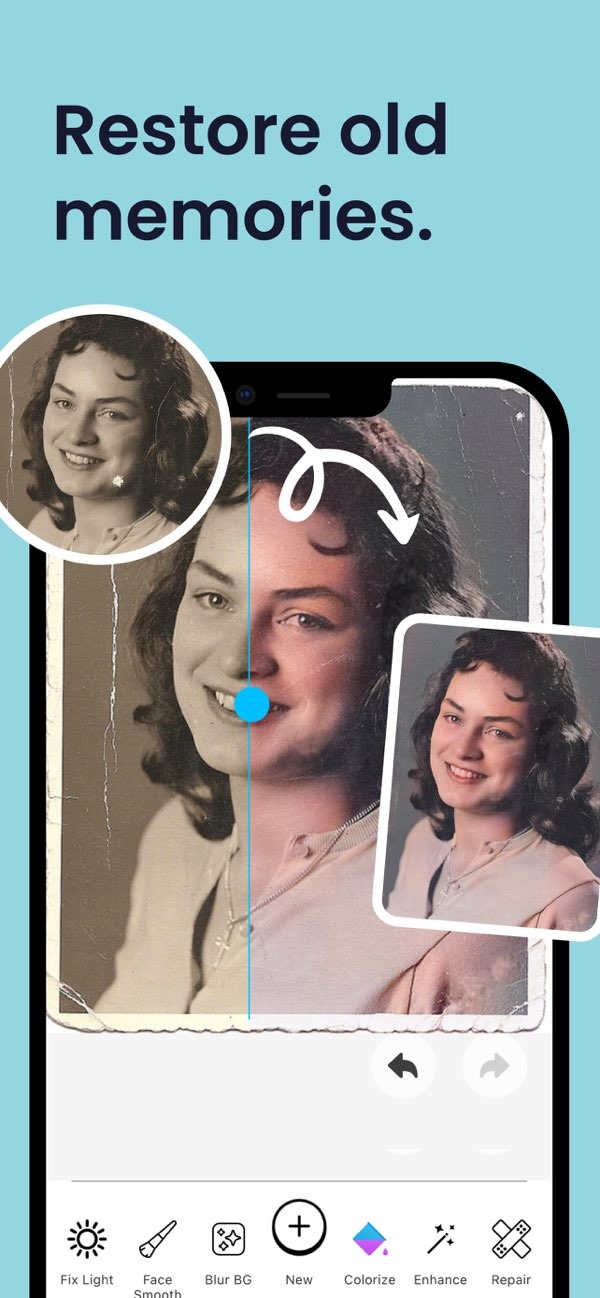
You can digitally restore old photos using the AI Photo Enhancer on iOS. The app includes tools to enhance and sharpen blurry photos, add color, and repair damage, helping you bring old memories back to life.
 |
 |
Understanding Photo Restoration
Photo restoration is the process of fixing and improving old or damaged photos. It can include correcting color, removing spots or marks, and sharpening the image to improve overall quality. Digital tools make this easier, so many people can restore photos using a smartphone or computer.
In the past, photo restoration often required professional skills and special equipment. Today, AI-powered apps like AI Photo Enhancer can help you get professional-looking results with less effort. These tools use advanced algorithms to find and fix common problems in photos.
 |
 |
Features of AI Photo Enhancer
The AI Photo Enhancer includes a full set of tools made to restore and improve old photos. Key features include:
- Enhance and Sharpen: Improves clarity in blurry photos, so they look more defined and lively.
- Colorization: Turns black and white photos into color, adding a new layer to your memories.
- Repair Tools: Fixes scratches, tears, and other physical damage in a digital way.
- Vibrant Filters: Uses AI-powered filters to improve the overall look of your photos.
- Portrait Auto Smoother: Smooths small flaws in portraits for a cleaner look.
- Blur Background: Changes background blur to help the subject stand out.
- Low Light Enhancement: Improves photos taken in low or poor lighting.
Step-by-Step Guide to Restoring Photos
Digital photo restoration can be simple when you have the right tools. Here is a step-by-step guide using AI Photo Enhancer:
Step 1: Download and Install the App
Download the AI Photo Enhancer from the App Store and install it on your device. The app is easy to use and works well for both beginners and advanced users.
Step 2: Upload Your Photo
Open the app and upload the photo you want to restore. The app supports many image formats, so it works with most photos.
Step 3: Use Enhancement Tools
Start with the enhance and sharpen tool to improve image clarity. This tool adjusts sharpness and contrast to make the photo look clearer and more vivid.
Step 4: Apply Colorization
If the photo is black and white, use the colorization feature to add realistic color. The AI predicts and applies colors that fit the likely time period and setting of the photo.
Step 5: Repair Damages
Use the repair tools to fix visible damage like scratches or tears. The app can fill in missing areas to help the photo look closer to its original condition.
Step 6: Final Touches
Add vibrant filters and use the portrait auto smoother for a more polished result. If needed, adjust the background blur to draw more attention to the subject.

Common Mistakes and How to Avoid Them
Digital restoration is easier than ever, but some common mistakes are still worth avoiding:
- Over-Enhancement: Do not overuse enhancement tools, since the photo can start to look unnatural. Aim for a balanced result.
- Ignoring Original Details: Try to keep original details whenever possible to preserve the photo’s authenticity.
- Incorrect Colorization: When adding color, choose colors that fit the time period to avoid historical inaccuracies.
If you keep these issues in mind, you can create a restoration that looks more natural and visually pleasing.
Limitations and Trade-offs
Even with strong digital tools, there are still limits and trade-offs to consider:
- Resolution Limitations: The final quality depends a lot on the original image resolution. Very low-resolution photos may not restore with the same level of detail.
- AI Limitations: AI can be very effective, but it may not always understand the full context of a photo. This can lead to less accurate results in some cases.
- Time Investment: These tools speed up the process, but getting the result you want can still take time and patience.
Knowing these limits helps you set realistic expectations and make better choices during the restoration process.
Conclusion
Digital photo restoration helps you preserve and improve important memories. With tools like AI Photo Enhancer, the process is more accessible and efficient. Whether you want to restore a family photo or improve a personal picture, these tools offer the features needed to produce strong results.
For more information and to explore additional features, visit the Editr Apps website.
Frequently Asked Questions
Can I restore photos without professional help?
Yes. With apps like AI Photo Enhancer, you can restore photos without professional skills or special equipment.
How does AI improve photo restoration?
AI helps by finding and fixing imperfections automatically, improving color, and sharpening images.
Is it possible to colorize black and white photos?
Yes. AI Photo Enhancer includes a colorization feature that adds realistic colors to black and white photos.
What are the limitations of digital photo restoration?
Limitations can include low original resolution, possible AI mistakes, and the time needed to reach the results you want.
Ready to restore your old photos? Download the AI Photo Enhancer on iOS and start restoring your memories today.
