
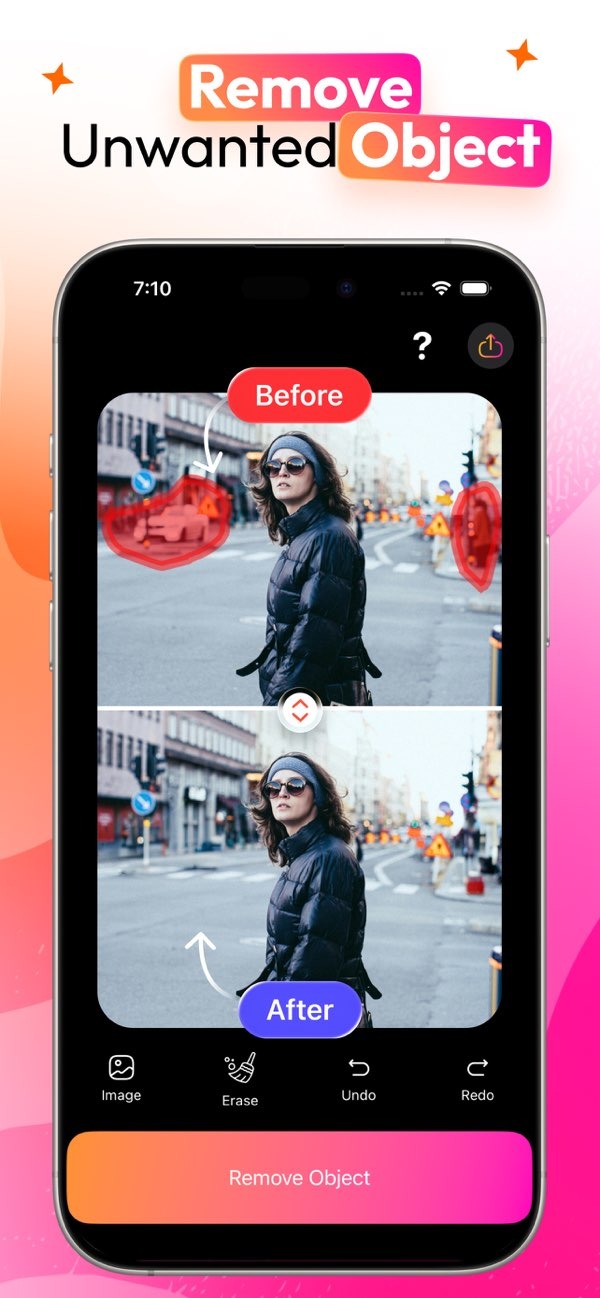
How can I remove unwanted objects from my photos easily?
You can remove unwanted objects from your photos with the AI Eraser on iOS. The app helps you erase objects smoothly, so your images look cleaner with little effort.
 |
 |
Understanding the Need for Object Removal in Photos
In the age of digital photography, it can be hard to capture a perfect moment without extra items in the shot. A stranger walking by, a random object, or another distraction can pull attention away from your main subject. A photo eraser tool like AI Eraser can help you clean up your images fast.
Object removal is useful for both beginners and professional photographers. It gives you more control over the final image and helps keep the focus on the subject. Thanks to newer AI tools, removing objects from photos is now easier and takes less time.
How Does AI Eraser Work?
AI Eraser uses advanced AI algorithms to find and remove unwanted objects in your photos. The app studies the image, spots the object you want to remove, and then fills in the missing area with a matching background. The process is meant to feel simple and needs very little input from you.
The app has a clear interface that lets you select the object you want to erase. After you select it, AI Eraser removes the object and blends nearby pixels so the result looks natural. This can be helpful for removing people, signs, or other distracting elements from your photos.
Step-by-Step Guide to Using AI Eraser
1. Download and install AI Eraser from the App Store.
2. Open the app and choose the photo you want to edit.
3. Use the selection tool to mark the object you want to remove.
4. Tap the erase button to remove the object.
5. Check the edited photo and make more changes if needed.
6. Save and share your updated photo.
Benefits of Using AI Eraser
AI Eraser has several benefits that make it a popular choice for photo editing. First, it offers a fast way to remove unwanted objects without complex software or advanced skills. This makes it easy to use for people at any skill level.
AI Eraser also helps keep the original image quality, so the final photo looks natural and polished. Its AI-based system rebuilds the background as accurately as possible, which helps protect the overall look of the photo.
Practical Scenarios for Using AI Eraser
Imagine you take a photo of a beautiful landscape, but a group of tourists walks into the frame. With AI Eraser, you can remove those distractions so the scenery stands out.
Another example is at events like weddings or parties, where signs, cables, or equipment may show up in the background. AI Eraser can help remove these items, so attention stays on the main people in the photo.
Common Mistakes and How to Avoid Them
Using a photo eraser tool is usually simple, but some common mistakes can affect the result. One issue is editing too much, which can make a photo look fake. Try to make sure the edited area matches the rest of the image.
Another mistake is skipping the final review. After editing, take a moment to look closely for odd textures, blurry spots, or small artifacts left behind. This helps the photo look as natural as possible.
Limitations and Trade-offs
AI Eraser is powerful, but it will not be perfect in every case. Busy backgrounds or fine details can be harder to rebuild, so you may need extra manual adjustments. Be ready to make small tweaks to get the result you want.
Also, while AI Eraser works well for many types of object removal, it may not always recreate the exact texture or pattern of the original background. Knowing these limits can help you set realistic expectations when using the app.
Frequently Asked Questions
Can AI Eraser remove people from photos?
Yes. AI Eraser is made to remove people from photos. It uses AI to fill in the background in a natural way after the person is removed.
Is AI Eraser available for Android devices?
Right now, AI Eraser is available on iOS devices. You can download it from the App Store.
Do I need any special skills to use AI Eraser?
No. You do not need special skills to use AI Eraser. The app is designed to be easy to use, so people at any experience level can remove unwanted objects from photos.

How does AI Eraser compare to other photo editing tools?
AI Eraser is known for being easy to use and for its AI-based approach. It offers a quick way to remove objects, which is why many users choose it.
Conclusion
AI Eraser is a helpful way to remove unwanted objects from photos and improve the focus of your images. By using AI, it makes editing simpler and more accessible. For more information on AI Eraser and other editing tools, visit Editr Apps.
If you want to try AI Eraser, download the app on iOS from the App Store and start making clean, distraction-free photos.
