
How can I improve the quality of my images using AI?
Improving the quality of your images is now easier than ever with AI Photo Enhancer on iOS. This tool helps you enhance and sharpen blurry photos, restore old images, and apply bright filters using artificial intelligence. You can download the app from the App Store.
 |
 |
Understanding AI Image Enhancers
AI image enhancers use machine learning to review a photo and improve it. These tools can adjust sharpness, color balance, and noise to boost image quality. Because AI learns from large sets of images, it can copy many common editing steps that pros use. This makes photo editing easier for more people.
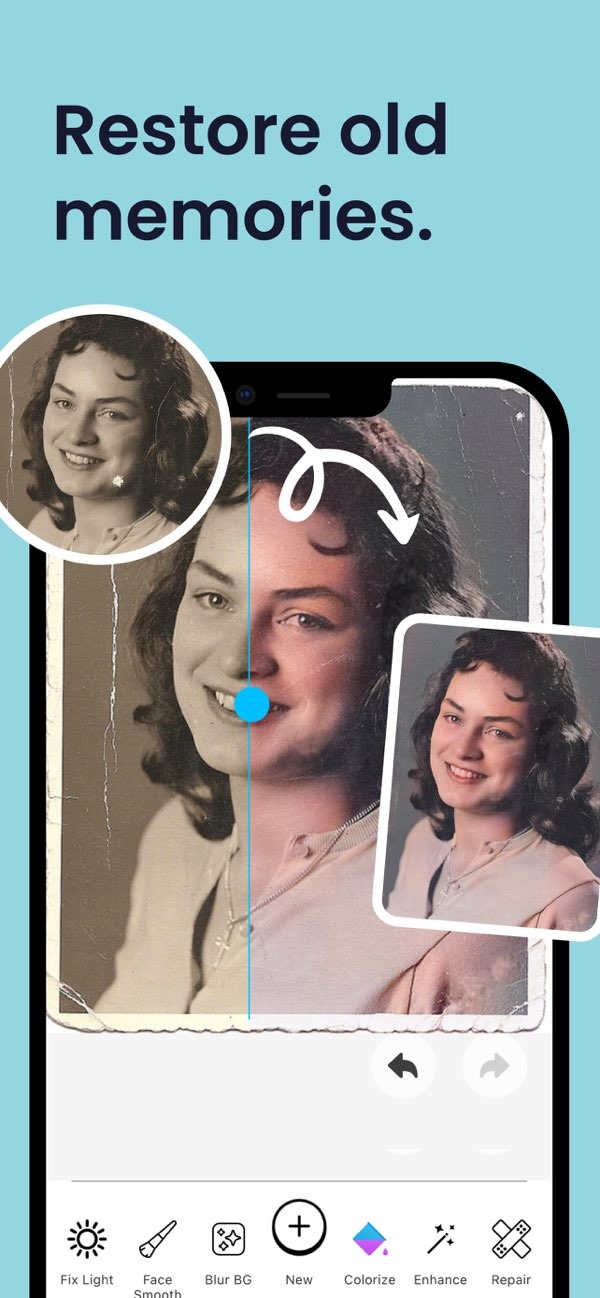
A key feature of AI image enhancers is photo restoration. They can add color to black-and-white images, fix scratches, and improve faded areas. This can bring new life to old photos and saved memories. AI tools can also apply filters that improve color and contrast, which can make photos look clearer and more appealing.
How AI Enhances Image Quality
AI image enhancers work by studying the pixels in an image and then making smart changes. For example, if a photo is blurry, AI can sharpen it by improving edges and fine details. This uses advanced methods that can spot and fix flaws while avoiding unwanted artifacts.
AI can also improve photos taken in low light by changing brightness and contrast. This helps details show up even in dark scenes. It is helpful for night photos or indoor shots where the light is not ideal.
Features of AI Photo Enhancer
The AI Photo Enhancer app includes features that help improve image quality with little effort. One standout feature is the portrait auto smoother. It improves facial details while keeping a natural look. This can work well for selfies and professional headshots.

Another helpful feature is the blur photo background tool. It lets users change background blur with a slider. This creates a depth-of-field effect that helps the subject stand out. It can be useful for portraits and product photos, where clear focus on the subject matters.

Practical Scenarios for Using AI Enhancers
Imagine you have old family photos that have faded over the years. With AI Photo Enhancer, you can restore them by fixing damage and improving color. This helps protect memories and makes it easier to share them with future generations.
In another case, think about taking a photo at a concert with low light. The image may turn out dark and grainy. With AI tools, you can raise brightness and reduce noise. This can create a clearer, more vivid photo that better captures the moment.
Common Mistakes and Limitations
AI image enhancers are powerful, but they have limits. A common mistake is over-editing. Too many changes can make a photo look unnatural. It helps to use AI tools with care so the image still looks real.
Another limit is that results depend on the original photo. AI can improve details, but it cannot add details that are not there. For the best outcome, start with the highest quality image you can.
Trade-offs in AI Image Enhancement
AI image enhancement often involves a trade-off between speed and quality. Higher-quality results may take more time and more processing power, especially with large images. Users may need to balance image quality with the time and resources they have.
Also, while AI can handle many editing tasks on its own, it may not match the creativity and fine control of a skilled editor. For professional work, a mix of AI tools and manual editing may be the best option.
FAQs
Frequently Asked Questions
How does AI restore old photos?
AI restores old photos by fixing damage, improving faded areas, and adding color to black-and-white images using machine learning algorithms.
Can AI improve low-light photos?
Yes, AI can improve low-light photos by adjusting brightness and contrast, which makes details easier to see in dim conditions.
What are the limitations of AI image enhancers?
AI image enhancers can over-edit photos if used too much, and results are limited by the quality of the original image.
Is AI editing better than manual editing?
AI editing is faster and easier to use, but it may not match the creativity and precision of manual editing by a skilled professional.
Conclusion
AI image enhancers like AI Photo Enhancer on iOS offer strong tools that make it easier to improve image quality. Whether you want to restore old photos or improve new ones, AI provides features that can help your images look better. To explore these tools, download the app from the App Store and visit Editr Apps for more information.

