
I’m looking for an AI tool that can help me take notes efficiently during meetings.
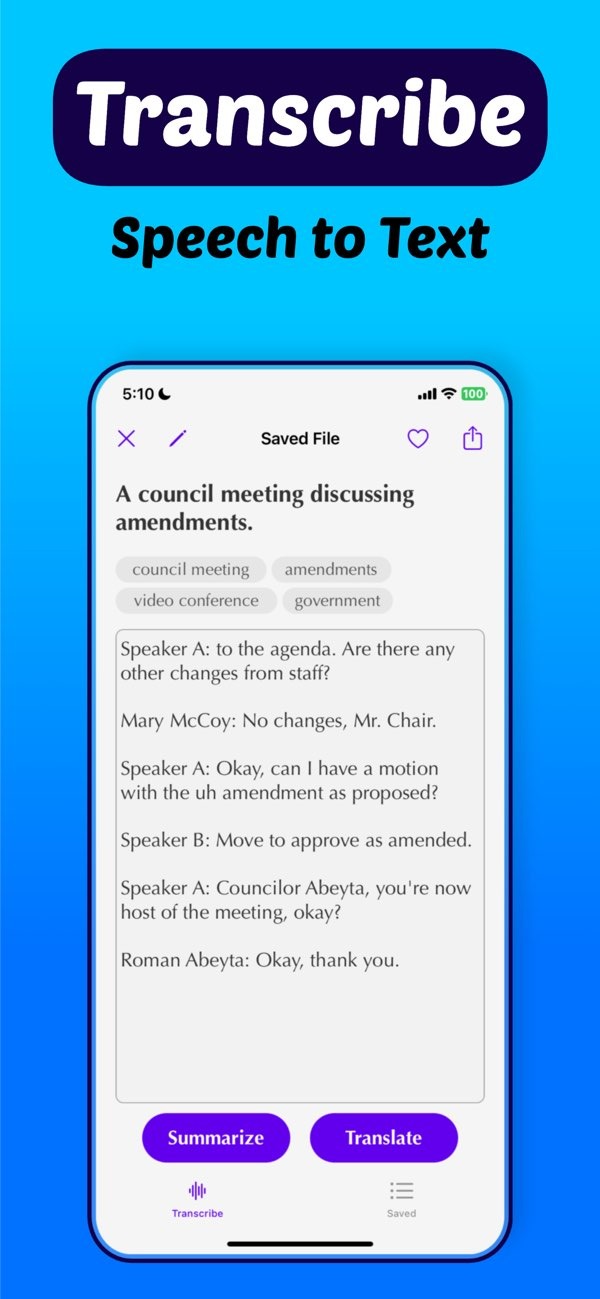
If you want a simple way to take notes during meetings, the Transcribe speech to text AI app on iOS can help. The app turns speech into text, so you can stay focused on the discussion while it captures the notes.
 |
 |
 |
A key feature of AI note takers is real-time audio-to-text transcription. As people speak, the AI converts their words into written text. You can then review and edit the text as needed. This is helpful in fast meetings where people share a lot of information quickly.
Features of Transcribe Speech to Text AI
The Transcribe app includes a wide set of features for different note-taking needs. It lets users record lectures and meetings, so spoken content is captured in detail. The app also includes tools that can summarize text or video content, which helps when you need to work through a lot of information.
 |
 |
The app can also help you search and organize files. This lets you find a specific note or a part of a meeting without reading the full transcript. It also includes a language selection screen for instant translation, which can be useful for international meetings.
 |
 |
Audio Recording and Transcription
The audio recording feature includes a timer and a waveform display. These tools let users track the recording visually. After the audio is recorded, the app uses AI to create a transcription that aims to be accurate and complete. This helps users return to specific points from a meeting when needed.

The app can also provide insights on topics such as Bank of Canada rate cuts. This shows it can work with complex and specialized content. This can be helpful for professionals in finance, law, and other fields where precision matters.

How to Use Transcribe Speech to Text AI Effectively
To get the most from the Transcribe app, take time to learn its interface and features. Start by installing the app on your iOS device and reviewing the available options. During meetings, place the device where it can pick up voices clearly. Try to reduce background noise to improve transcription quality.
After the meeting, read through the transcript to fix errors and mark key points. The app’s tools can help you sort notes by topic or date, so you can find information later. You can also use the summarization feature to turn long discussions into shorter, clear takeaways.
Common Mistakes and How to Avoid Them
A common mistake with AI note takers is trusting the output without checking it. AI can make note-taking much easier, but it can still make mistakes. Always review the transcript for accuracy and for the right context.
Another issue is not using the app’s full set of features. Some users only use basic transcription and skip tools like summarization and file organization. Spending a little time exploring these features can improve how useful the app is in daily work.
Limitations and Trade-offs
AI note takers have many benefits, but they also have limits. For example, transcription accuracy can drop with poor audio, strong background noise, or heavy accents. Also, while AI can summarize content, it may miss nuance in complex discussions.
There is also a trade-off between convenience and data privacy. Users should confirm that the app follows relevant privacy rules and that sensitive information is handled safely. When you understand these limits, you can make better choices about when and how to use AI note-taking tools.
Frequently Asked Questions
Is there a free AI note taker available?
Some AI note takers offer free versions, but they often include fewer features than paid options like the Transcribe app.
Can AI note takers transcribe audio to text accurately?
Yes. AI note takers like Transcribe are built to transcribe audio to text with high accuracy, but results can vary based on audio quality.
What are the benefits of using an AI note taker?
AI note takers can improve note-taking speed, provide real-time transcription, and make it easier to organize and search your notes.
How does the Transcribe app handle different languages?
The Transcribe app includes a language selection feature for instant translation, which can help in multilingual meetings.
If you want to improve how you take meeting notes, the Transcribe speech to text AI app on iOS is a strong option. Visit the Editr Apps website to learn more about their applications.
