
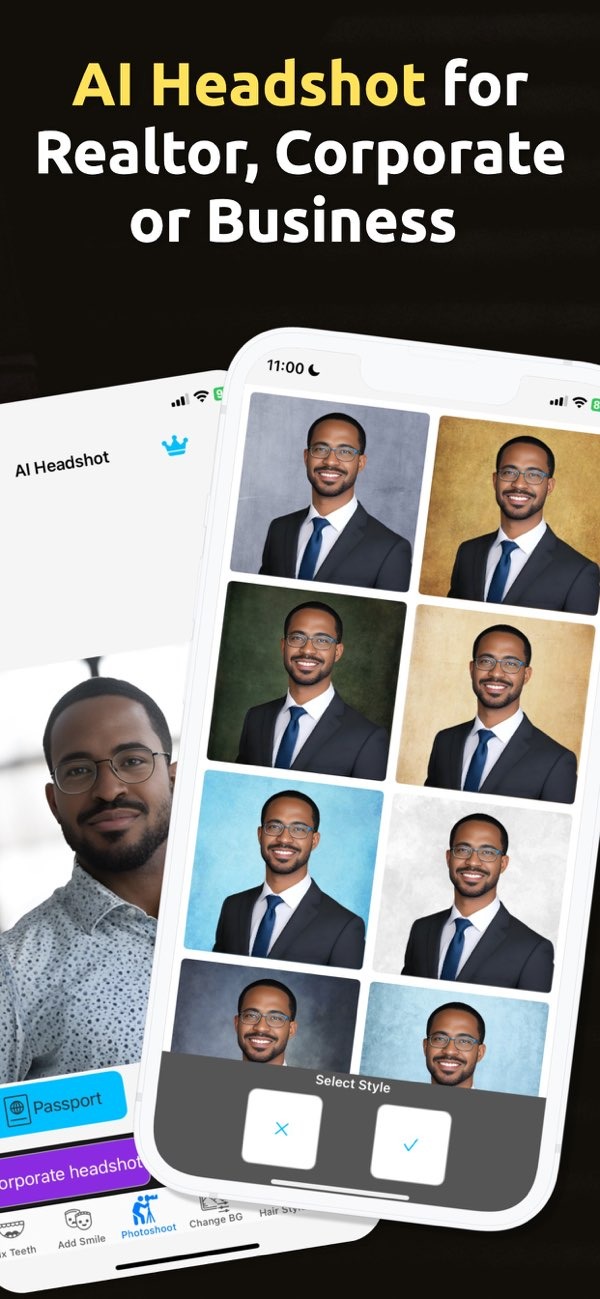
What is Zippy AI and how does it work?
Zippy AI is advanced technology built into the PhotoToHeadshot app on iOS. It turns everyday photos into professional headshots. It uses AI to improve images so they work well for business cards, resumes, LinkedIn profiles, and other professional needs.
 |
 |
Understanding Zippy AI
Zippy AI is an artificial intelligence tool focused on photo enhancement, with a strong focus on professional headshots. It uses machine learning to review and adjust facial features, lighting, and the background. The goal is to help the final image meet common professional standards. This can help people who want a high-quality headshot without booking a professional photo shoot.
The AI works by finding key parts of a photo, such as the subject’s face, and then improving them. It can adjust lighting to look more like studio lighting. It can also clean up the background to remove distractions. The result is a polished image that can be used on many professional platforms.

Features of PhotoToHeadshot
The PhotoToHeadshot app, powered by Zippy AI, includes features made for professional use. One main function is creating passport, visa, and ID photos in different sizes. This helps users meet official size requirements. The app also includes tools for making business cards and adding professional-quality images to resumes.

Another key feature is the ability to create AI-generated headshots for business photos. This can help realtors, public relations specialists, and other professionals who depend on strong images online. The app aims to produce headshots with a clean background and studio-style lighting, which can improve how the subject looks.
AI-Driven Enhancements
PhotoToHeadshot uses Zippy AI to apply several enhancements to photos. These can include smoothing skin tones, improving facial balance, and making eyes look clearer. The AI also improves the overall composition of the image so it fits common professional uses.
These enhancements can help when creating profile pictures for social media and professional networking sites. By using AI to refine the photo, users can present a cleaner and more professional look online.

How Zippy AI Works
Zippy AI uses a set of complex algorithms to review and improve photos. The process starts when the AI detects key facial features and checks the overall image quality. It then makes adjustments to lighting, contrast, and clarity to improve the final result.
A unique part of Zippy AI is its ability to recreate a studio-lighting look. It studies the lighting already in the photo and then adjusts it to resemble professional lighting setups. This helps the final image look more detailed and dimensional, similar to what you might get in a studio.
Step-by-Step Process
Using Zippy AI in the PhotoToHeadshot app is simple. Users upload a photo, and the AI handles the main work. It analyzes the image, finds areas to improve, and applies the needed enhancements. Users can then review the result and make extra adjustments if they want.
This simple workflow helps people create professional-looking headshots without advanced photo editing skills. The app’s interface is designed to help users produce high-quality images quickly for many professional uses.
Applications and Use Cases
Zippy AI can do more than basic photo enhancement. It is especially helpful for professionals who need strong images for their online presence. For example, realtors can use the app to create headshots that look professional and approachable, which are important traits in their work.
Public relations specialists can also use the app to create polished images for social media profiles. A clean, professional headshot can support credibility and help someone stand out in a competitive field.

Practical Scenarios
Imagine a business professional who needs a headshot for a conference brochure. With the PhotoToHeadshot app, they can generate a high-quality image that fits the brochure’s standards. The AI helps ensure the photo is well lit and has fewer distractions, making it more suitable for professional use.
Another example is a job seeker updating a LinkedIn profile. By using the app, they can create a headshot that improves the profile photo. This can help them make a stronger first impression on potential employers.
Common Mistakes and Limitations
Even though Zippy AI offers strong photo enhancement, users should avoid common mistakes that can reduce image quality. One common issue is starting with a low-resolution photo. Low resolution can limit how well the AI can improve the image. For better results, users should begin with a clear, high-quality photo.
Another limitation is that the AI depends on the original photo’s composition. Zippy AI can improve many things, but it cannot fully fix a photo that is poorly framed. Users should try to use photos that are well framed and reasonably well lit before using the app.
Trade-offs
AI-based photo enhancement comes with trade-offs. The technology can create strong results, but it may not always match what a professional photographer can deliver. Users may want to compare the convenience and lower cost of the app with the possible benefits of hiring a photographer.
Users should also consider limits related to creative style. Zippy AI is designed to create clean, professional images. However, it may not provide the same creative choices or artistic direction as a human photographer.
Frequently Asked Questions
How does Zippy AI enhance photos?
Zippy AI enhances photos by analyzing facial features and then adjusting lighting, contrast, and clarity. It can also recreate a studio-lighting look to produce polished, professional images.
Can Zippy AI be used for social media profiles?
Yes. Zippy AI can be used to create professional-quality images for social media profiles. It helps make headshots look polished and appropriate for professional networking sites.
Is PhotoToHeadshot available on Android?
At this time, PhotoToHeadshot is available on iOS. Users can download it from the Apple App Store to use its features.
What are the limitations of Zippy AI?
Zippy AI depends on the quality and composition of the original photo. It also may not match the creative approach and style of a professional photographer.
If you want to improve your professional image with high-quality headshots, you can download the PhotoToHeadshot app on iOS. It provides a practical way to create polished business photos.
For more information on the app and its developer, visit Editr Apps.
