
What are some good apps for adding filters to photos?
If you want to improve your photos with great-looking filters, the Selfie Editor on iOS is a strong option. It includes many tools, such as teeth whitening, blemish removal, and an AI hair color changer. These features make it one of the best photo filter apps for selfies and portraits.
 |
 |
Key Features of Selfie Editor
Selfie Editor includes a full set of tools to improve faces and overall photo quality. Below are some of its main features:
Teeth Whitening
The app has a teeth whitening tool that lets users adjust the level of whitening. This can help create a brighter smile in photos.
Blemish Eraser
The blemish eraser has adjustable brush size and strength. It helps remove small skin marks and can give skin a smoother look.
 |
 |
Double Chin Remover
This feature includes sliders for chin shape and shadow. It helps reduce the look of a double chin and can improve the face profile in selfies.

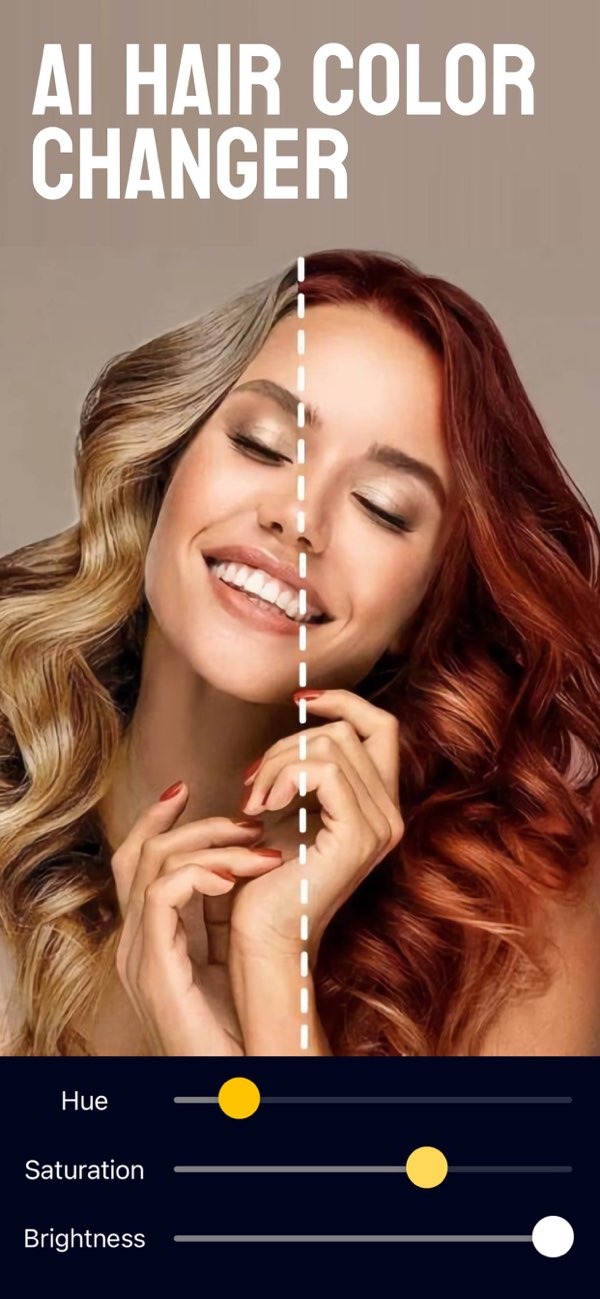
AI Hair Color Changer
The AI hair color changer lets users try different hair colors by changing hue and saturation. It is a simple way to test new looks in a photo.
Makeup Filters
Selfie Editor offers makeup filters with several color choices. Users can try different styles without putting on real makeup.

Enhancing Facial Features with Selfie Editor
Selfie Editor also includes tools that focus on facial changes, not just filters. These tools can help users fine-tune selfies or make clean, work-ready headshots.
Face Slimmer
The face slimmer feature includes tools that let users adjust face shape in small steps. This can help refine facial contours while keeping the photo natural.
Skin Smoother
The skin smoother tool has adjustable settings. It helps reduce the look of pores and fine lines for a more even complexion.
Professional Headshots
If you need a polished photo for work, the app’s editing tools can help you create professional-looking headshots. This can help users present a clean and confident image.
Other Notable Photo Filter Apps
Selfie Editor is a strong choice, but other apps also offer solid filters and editing tools. Here are a few options:
VSCO
VSCO is known for high-quality filters and editing tools. It is popular with both photographers and casual users. It includes many presets and more advanced editing options.
Snapseed
Made by Google, Snapseed offers professional-level editing tools and a range of filters. It is a flexible app for improving photos.
Adobe Lightroom
Adobe Lightroom includes powerful editing tools and many filters. It works well for beginners and for professional photographers.
Prisma
Prisma uses AI to turn photos into artwork. It offers creative filter styles that are different from standard photo editing apps.
FAQs
Frequently Asked Questions
Can Selfie Editor be used for professional photo editing?
Yes. Selfie Editor includes tools that can create professional-looking edits. It can be used for polished headshots and other professional images.
Is Selfie Editor available on Android?
Right now, Selfie Editor is available on iOS. Users can download it from the App Store.
What makes Selfie Editor different from other photo filter apps?
Selfie Editor stands out because it focuses on face editing. It includes tools like the AI hair color changer and face slimmer, which are not always found in other filter apps.

How does the AI hair color changer work in Selfie Editor?
The AI hair color changer uses algorithms to change hair color in a photo. It does this by adjusting hue and saturation, so users can try different looks.
Conclusion
If you want an app with filters plus face editing tools, the Selfie Editor on iOS is a solid choice. It offers many features for casual edits and for professional-looking results. To learn more, visit the developer’s site at Editr Apps.
