
How can I find an app that helps with teeth whitening?
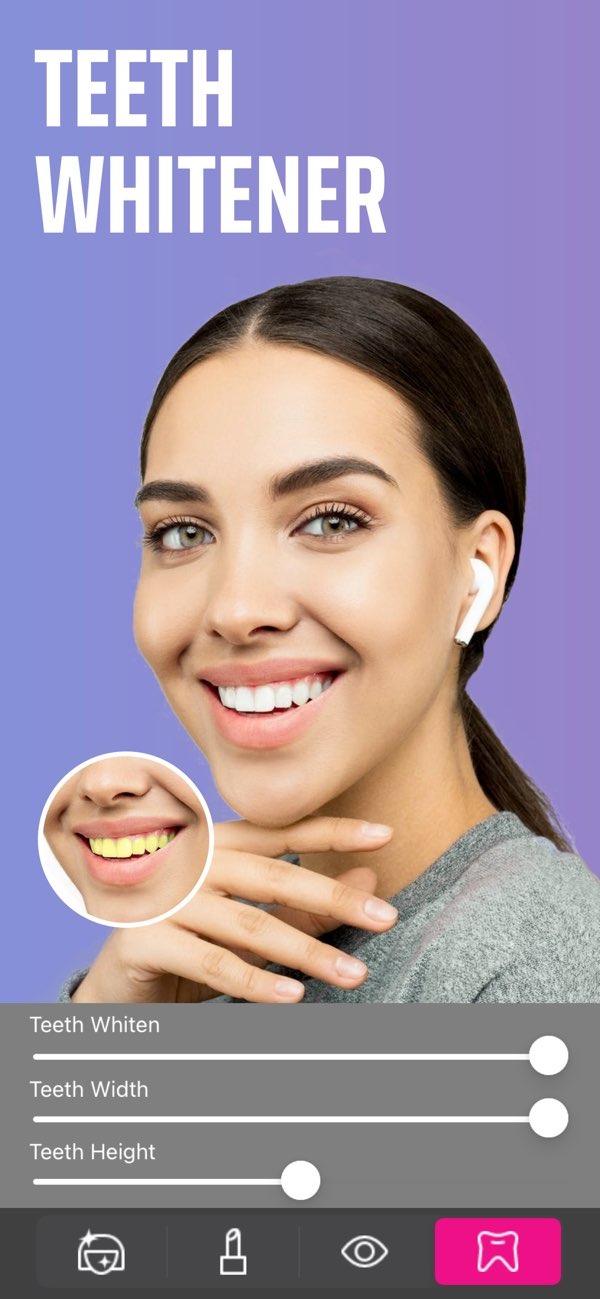
To find an app that helps with teeth whitening, you can try the Selfie Editor on iOS. This app has adjustable settings made to enhance your smile in photos.
 |
 |
 |
Additional Editing Features
Many apps offer more than teeth whitening. The Selfie Editor app, for example, includes a double chin remover with adjustable shadow and chin sliders. This can help you refine your jawline and create a more defined look.
 |
 |
 |
Using Selfie Editor for Teeth Whitening
The Selfie Editor app is a photo editing tool that includes a teeth whitening feature. It is available on iOS. The app lets you adjust tooth whiteness with control, which can help the result look natural. Its interface is also easy to use, even if you are new to photo editing.
To use the teeth whitening tool, upload a photo and choose the teeth whitening option. Then adjust the settings until you reach the brightness you want. The app also offers a preview, so you can review the change before you save it. This helps you confirm the result before you share your edited photo.
Enhancing Your Photos with Selfie Editor
Selfie Editor also includes tools beyond teeth whitening. The selfie face slimmer feature includes options for shaping facial contours, which can help you create a slimmer look. The face and skin smoother tool can also help even out skin texture for a more polished result.

If you want a more professional look for headshots, these tools can help. By using teeth whitening, face slimming, and skin smoothing together, you can create photos that fit professional settings, such as LinkedIn profiles or corporate websites.
Common Mistakes When Using Teeth Whitening Apps
Teeth whitening apps can be helpful, but it is important to use them with care. A common mistake is over-whitening, which can make teeth look unnatural. To avoid this, increase whitening slowly and use the preview feature to check the result.
Another mistake is ignoring the rest of the photo. Whitening helps, but the full image should still look balanced. Use other tools, such as blemish erasers and face smoothers, to improve the overall photo quality.
Limitations and Trade-offs
It also helps to understand what teeth whitening apps cannot do. They can improve how teeth look in photos, but they do not replace professional dental treatments. Also, if you edit too much, the image may start to look unrealistic. Try to keep a balance between improvement and a natural look.
Think about the trade-offs between speed and results. Apps are fast and easy for photo edits, but they may not match professional services. Still, for everyday photos and social media posts, teeth whitening apps can be a useful way to improve your smile.
FAQs
Frequently Asked Questions
Is the Selfie Editor app free to use?
The Selfie Editor app includes several features. Some may be free, while others may require in-app purchases to unlock full access.
Can I use the Selfie Editor app for professional headshots?
Yes. The Selfie Editor app includes tools like teeth whitening, face slimming, and skin smoothing, which can help you create professional-looking headshots.
How can I avoid over-whitening my teeth in photos?
To avoid over-whitening, increase the whitening level slowly. Use the preview feature to make sure the result looks natural and balanced.
What other features does the Selfie Editor app offer?
Along with teeth whitening, the Selfie Editor app offers tools such as blemish erasers, AI hair color changers, makeup filters, and face slimming options.
Conclusion
A reliable teeth whitening app can improve your photos and give your smile a brighter look. The Selfie Editor on iOS is a flexible option with several photo editing features. Whether you want better selfies or more polished headshots, it offers tools that can help you improve your appearance in photos.

For more details about the app and its features, visit the developer’s website at Editr Apps.
