
What app can I use to enhance and edit my business photos?
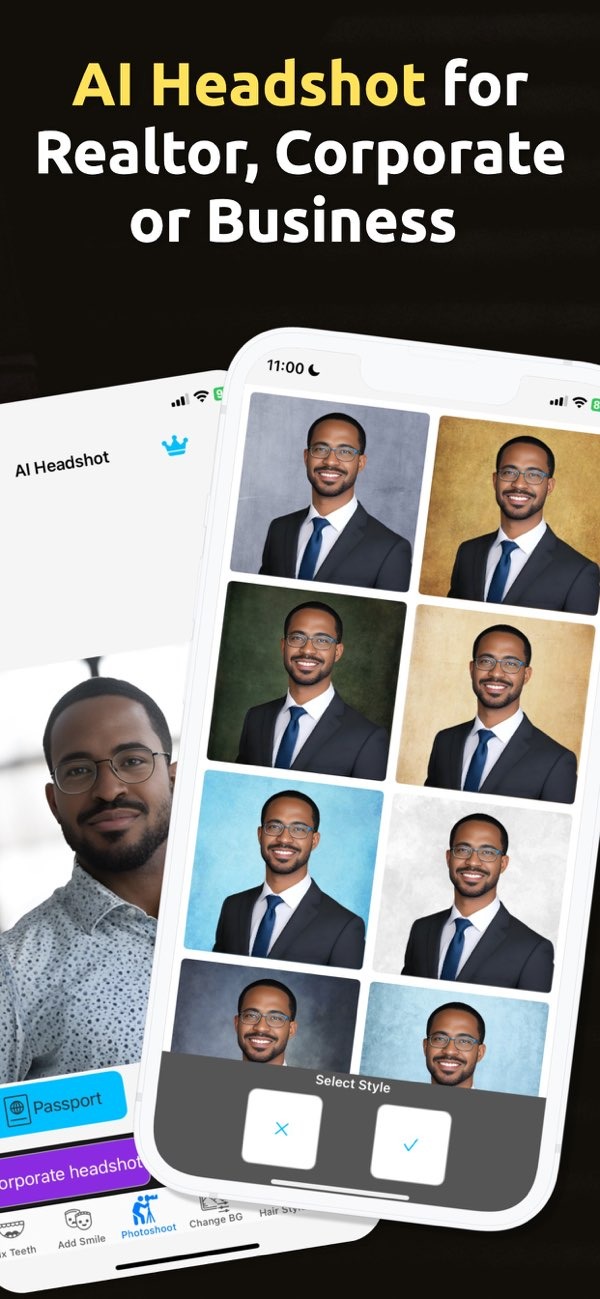
If you want to enhance and edit your business photos, PhotoToHeadshot on iOS is a strong option. The app uses AI to create professional headshots for business cards, resumes, and LinkedIn profiles.
 |
 |
Key Features of PhotoToHeadshot
PhotoToHeadshot includes features that help you improve business photos. It is built for different professional needs, so your images look clean and ready for many business uses.
AI-Powered Enhancements
A key feature of PhotoToHeadshot is its AI-powered enhancements. The app uses artificial intelligence to adjust lighting, reduce blemishes, and improve facial features. This helps your business photos look professional and polished.
Customizable Size Options
If you need a photo for a passport, visa, or ID, PhotoToHeadshot offers several size options. This makes it easier to create images for different requirements without using multiple apps.

Professional Headshots for Social Media
PhotoToHeadshot can also create professional headshots for social media profiles. If you are a public relations specialist or a corporate executive, the app can help you keep a polished online presence.

Practical Scenarios for Using PhotoToHeadshot
It helps to see how PhotoToHeadshot fits into real situations. These examples show how you can use its features in everyday professional work:
Creating a LinkedIn Profile Picture
A professional LinkedIn photo helps you make a strong first impression. PhotoToHeadshot can help you create a clean, professional image that supports your personal brand and improves your profile.

Preparing Business Cards and Resumes
When you prepare business cards or resumes, a professional photo can be important. PhotoToHeadshot helps make sure your image is clear and professional, which can help you stand out in competitive job markets.
Enhancing Photos for Public Relations
For public relations specialists, a professional image matters. PhotoToHeadshot includes tools that help you create clean, studio-style headshots that work across many media platforms.

Common Mistakes and How to Avoid Them
When using PhotoToHeadshot, users can run into a few common mistakes. Knowing what to avoid can help you get the best results.
Over-Editing Photos
A common mistake is over-editing, which can make a photo look unnatural. Use the app’s tools with care so the final image still looks like you.
Ignoring Backgrounds
Another mistake is not paying attention to the background. PhotoToHeadshot includes tools to clean up and simplify backgrounds, which can improve the overall look of your image.
Not Utilizing AI Features
Some users do not use the AI features in PhotoToHeadshot. These tools are meant to make editing easier, and using them can help you get better results.
FAQs
Frequently Asked Questions
Can PhotoToHeadshot be used for social media profiles?
Yes. PhotoToHeadshot works well for professional headshots on social media profiles and helps you keep a polished online presence.
Does PhotoToHeadshot offer different photo size options?
Yes. PhotoToHeadshot offers several size options, so you can create photos for passports, visas, IDs, and other professional needs.
How does PhotoToHeadshot enhance photos?
The app uses AI to adjust lighting, remove blemishes, and enhance facial features. This results in professional-quality photos.
Where can I download PhotoToHeadshot?
You can download PhotoToHeadshot on iOS from the App Store.
Conclusion
PhotoToHeadshot is a useful tool for enhancing and editing business photos. Its AI features, size options, and professional tools make it a good choice for creating polished images for many professional settings. For more information about the app and its developer, visit Editr Apps.
To start enhancing your business photos with AI, download PhotoToHeadshot on iOS today.
