
How can I create realistic photos using AI?
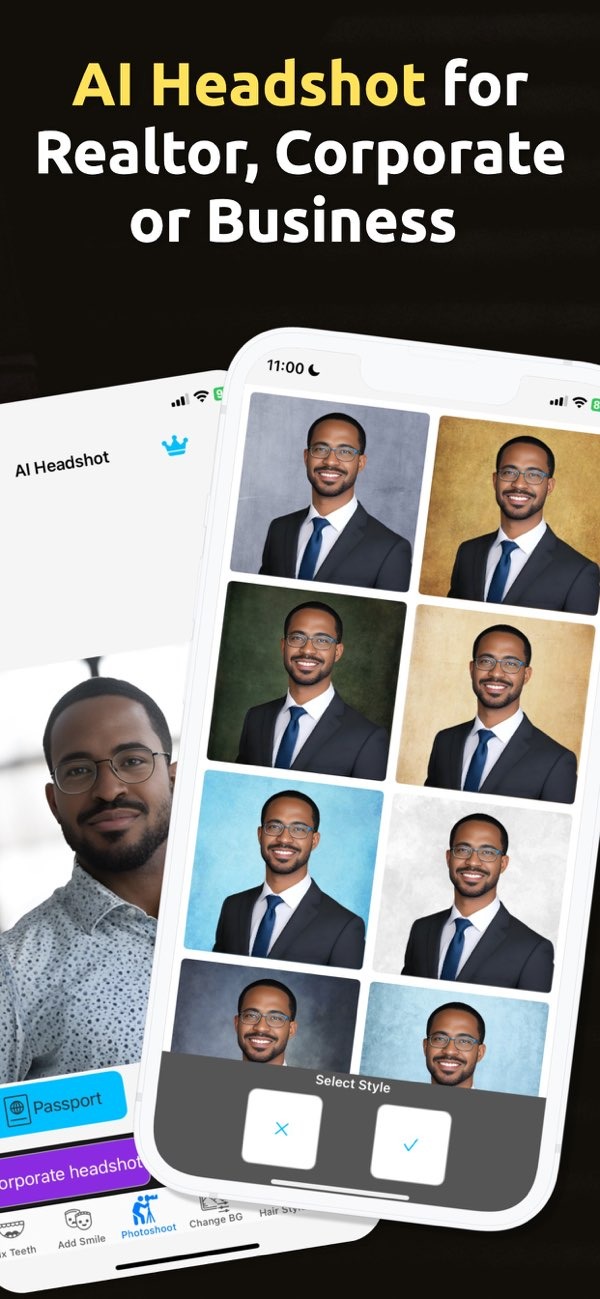
Creating realistic photos with AI is easier than ever with apps like PhotoToHeadshot on iOS. This app helps users create professional photos, including headshots, with clean backgrounds and studio-style lighting. Whether you need a passport photo, a LinkedIn profile picture, or an image for a business card, AI can help you get a polished look with less effort.
 |
 |
Understanding AI Generated Photos
AI generated photos are images that artificial intelligence creates or improves. These systems study visual details and then change or build an image based on what they learn. The results can range from artistic styles to very realistic portraits. Many tools use deep learning models trained on large sets of images. This training helps the AI copy human features and common lighting patterns.
A key benefit of AI generated photos is speed. AI can produce high-quality images in a short time. This helps in professional settings where time and accuracy matter. AI photo tools also support customization. Users can often change the background, adjust lighting, and fine-tune facial details to match their needs.
How AI Enhances Professional Photos
AI has changed how people create professional photos. With AI tools like PhotoToHeadshot, you can create images that meet professional standards without costly gear or advanced photography skills. The app includes features like clean backgrounds and studio lighting, which are important for professional headshots.

AI can also retouch photos automatically. It can reduce blemishes and improve small details to create a cleaner look. This can help with business profiles and resumes, where first impressions matter. When the results are consistent and clear, it is easier to present yourself in a professional way.
Practical Applications of AI Generated Photos
AI generated photos can be used in many situations. They work well for passport, visa, and ID photos, which often have strict size and quality rules. AI can also help create images for business cards, resumes, and LinkedIn profiles, where a professional look is expected.

Social media profiles can benefit as well. Public relations specialists, for example, may use these images to keep a consistent and professional online presence. Since AI can create high-quality photos quickly, it can be useful in both professional and personal settings.

Using PhotoToHeadshot for AI Generated Photos
PhotoToHeadshot is an app that uses AI to create professional headshots and profile pictures. It is available on iOS and has a simple interface that makes the process easier. Users can pick from different size options based on their needs, such as passport photos or LinkedIn profile images.
The app’s AI features help produce a clean background and studio-style lighting, which are key parts of a professional photo. Because the app automates much of the editing work, it can save time and reduce manual effort. This lets users focus on other tasks while still getting a strong final image.
Step-by-Step Guide to Using PhotoToHeadshot
1. Download and install PhotoToHeadshot on iOS.
2. Open the app and choose the type of photo you need (for example, passport, business card, or LinkedIn profile).
3. Upload a photo or take a new one with your device’s camera.
4. Use the app’s AI tools to adjust the background and lighting to match your preference.
5. Save the final image to your device or share it directly from the app.
Common Mistakes and Limitations
AI generated photos have many benefits, but there are also common issues to watch for. One mistake is using too many AI edits. Too much retouching can make a photo look unnatural. In most cases, it helps to use AI to improve the image while keeping a natural look.
Another limitation is the quality of the original photo. AI can improve an image, but it works best when the starting photo is already clear. For better results, start with a photo that is well-lit and in focus. A strong base image helps the AI produce a more realistic final result.
Frequently Asked Questions
Can I create AI generated professional photos for free?
Yes, some apps like PhotoToHeadshot offer free features that let users create professional photos with AI.
What are the benefits of using AI for headshots?
AI can create high-quality headshots quickly. It can also add clean backgrounds and studio-style lighting, which are important for professional images.
Is there a free AI professional headshot generator?
Yes, PhotoToHeadshot offers free options for generating professional headshots with AI. This makes it easier for users who need high-quality images.
How does AI improve the quality of photos?
AI can improve photo quality by enhancing features, adjusting lighting, and reducing small imperfections. This can result in a more polished and professional image.
Conclusion
AI technology has made it simpler to create realistic and professional photos. With tools like PhotoToHeadshot, users can generate high-quality images for many professional needs. Whether you need a photo for a business profile or a social media account, AI generated photos can be a practical and effective option.
To explore what AI generated photos can do, download PhotoToHeadshot on iOS and start creating professional images. For more details about the app and its features, visit the developer’s website at Editr Apps.
