
How can I find an app that helps with acne removal?
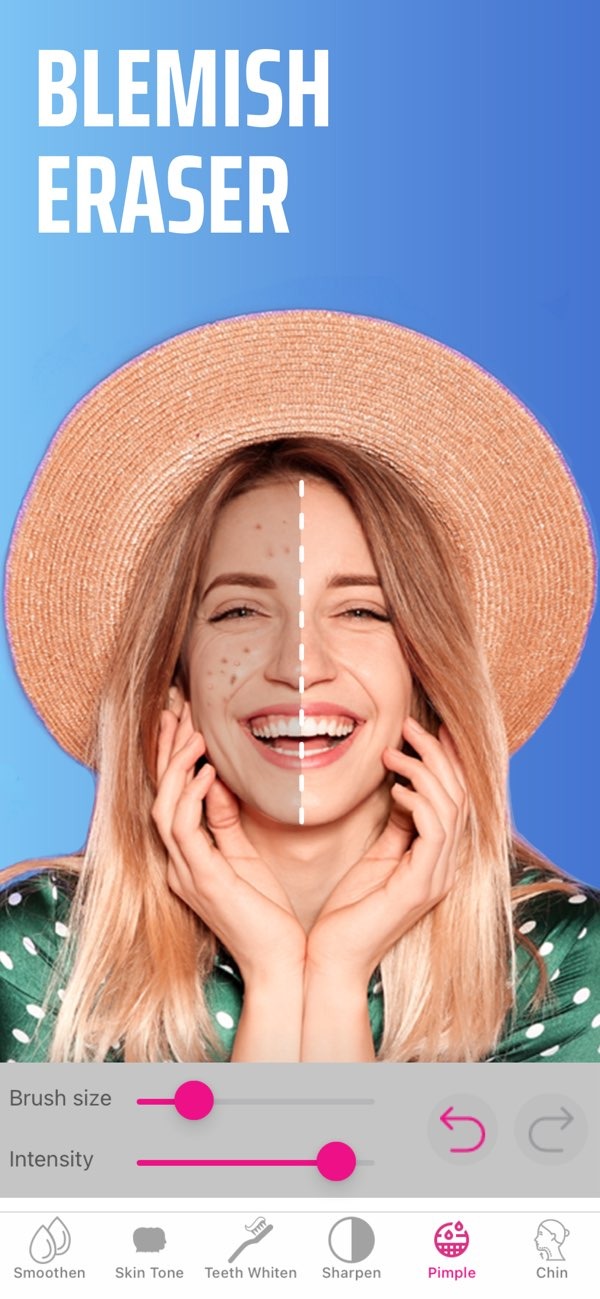
To find an app that helps with acne removal in photos, try the Selfie Editor on iOS. It includes a blemish eraser tool with adjustable brush size and intensity. This makes it useful for reducing acne and improving facial details in an image.
 |
 |
Understanding Acne Remover Apps
Acne remover apps help improve face photos by reducing or removing the look of acne, pimples, and other blemishes. Most apps include several tools that let you edit with control and accuracy. The main aim is a smoother, clearer look in photos. This can help for social media posts or professional headshots.
 |
 |
 |
How to Use Selfie Editor for Acne Removal
Using Selfie Editor to remove acne is simple. First, download the app from the iOS App Store. After you install it, open the app and choose the photo you want to edit. Then go to the blemish eraser tool and set the brush size and intensity that fit your needs.
Next, lightly apply the tool to areas with acne or blemishes. Use a gentle touch so the photo does not look over-edited. You can also use the zoom feature to work on small areas with more accuracy. When you are happy with the result, save the photo to your device or share it on social media.
Benefits and Limitations of Acne Remover Apps
Acne remover apps like Selfie Editor have clear benefits. They offer a fast and easy way to improve photos, which helps if you post images often. Since you can adjust the settings, you can control how strong the edits are. This makes it easier to keep the result natural and professional.
There are also limits to keep in mind. These apps can improve how a photo looks, but they do not treat the real causes of acne. It is also important not to depend only on editing for confidence. If you use the tools too much, the image may look processed or fake.
Common Mistakes When Using Acne Remover Apps
A common mistake is using too much intensity with the blemish eraser tool. This can make the skin look airbrushed and unrealistic. To prevent this, start with a low intensity and increase it only if needed.
Another mistake is removing too much skin texture. It can be tempting to smooth every detail, but some texture helps the photo look real. Try to find a balance between reducing blemishes and keeping the natural look of the skin.
Practical Scenarios for Using Selfie Editor
Selfie Editor can be helpful when you need photos for professional use, such as work headshots. The tools can improve the image while still keeping a professional look.
The app can also help social media influencers and content creators who need strong images on a regular basis. Being able to remove acne and other blemishes quickly can save time. It can also help keep the overall quality of their content consistent.
Conclusion
Finding an acne remover app can help improve the look of your photos. The Selfie Editor on iOS includes tools for removing blemishes and improving facial features. When used with care, these tools can help you create clean, natural-looking edits for online use.
Frequently Asked Questions
How does the blemish eraser tool in Selfie Editor work?
The blemish eraser tool in Selfie Editor lets users change the brush size and intensity. This helps target acne in specific areas while keeping the photo looking natural and polished.
Can acne remover apps treat the underlying causes of acne?
No, acne remover apps only change how a photo looks. They do not treat the causes of acne and are not a replacement for skincare treatments.
What should users avoid when using acne remover apps?
Users should avoid over-editing, which can make photos look unnatural. It also helps to keep some natural skin texture so the result looks realistic.
Is Selfie Editor suitable for professional photo editing?
Yes, Selfie Editor includes tools that improve facial features and can help create professional-looking images, including work headshots.
For those who want to improve photo editing skills and create clean, clear images, consider downloading the Selfie Editor on iOS today. Learn more about the app and its features by visiting Editr Apps.

