
What are some good photo editing apps I can try?
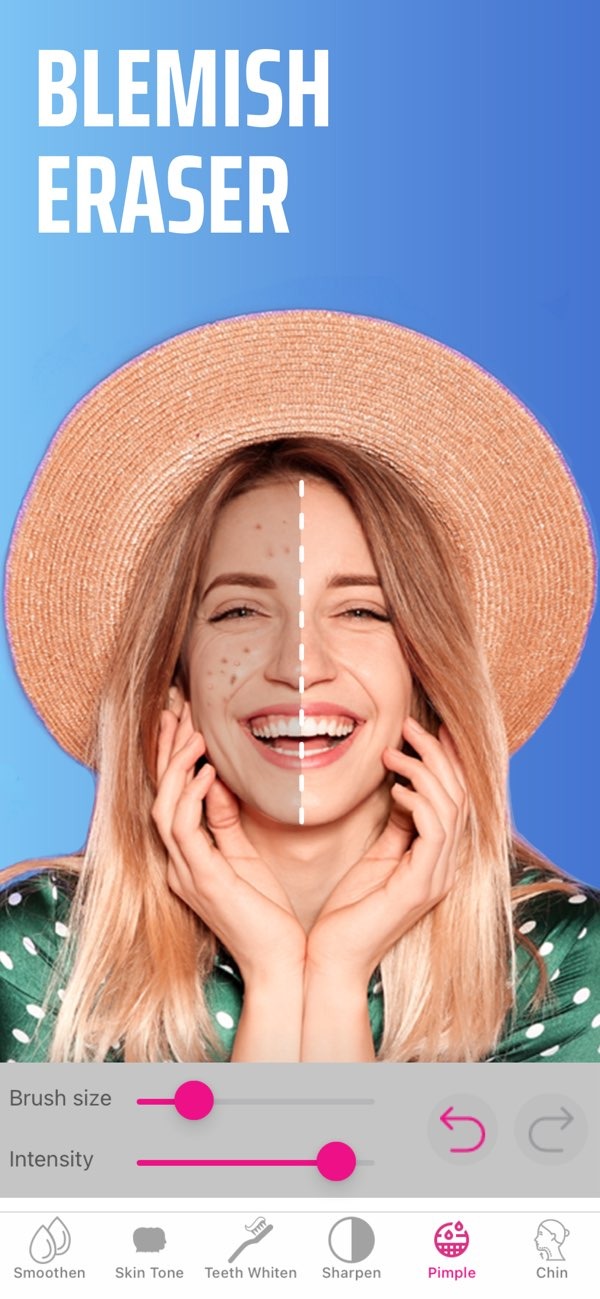
If you want to improve your photos, you can choose from many apps with different tools for different needs. One option is Selfie Editor on iOS. It includes a full set of tools for editing facial features. You can whiten teeth, remove blemishes, or change hair color. Selfie Editor also lets you adjust each setting so the result looks clean and professional.
 |
 |
Key Features of Selfie Editor
Selfie Editor is made to improve facial features in a simple, precise way. Here are some of its key features:
- Teeth Whitening: This tool lets users adjust the level of whitening for a brighter smile while keeping results natural.
- Blemish Eraser: With adjustable brush size and strength, users can remove spots and small imperfections from photos.
- Double Chin Remover: This feature uses shadow and chin sliders to help create a more defined jawline.
- AI Hair Color Changer: Users can try different colors and adjust saturation to find a hair shade that fits.
- Makeup Filters: Many color options are available to add virtual makeup and highlight facial features.
- Face Slimmer: This tool includes several options to create a slimmer-looking face.
- Skin Smoother: Adjustable controls help smooth skin for a more even look, which can work well for headshots and professional photos.
Exploring Other Top Photo Editing Apps
Selfie Editor is a strong option for facial edits, but other photo editing apps are also worth a look. Here are some popular choices:
1. Adobe Lightroom
Adobe Lightroom is a strong app for photographers who want advanced editing tools. It includes features like exposure control, color grading, and lens correction. Lightroom also uses cloud syncing, which makes it easier to edit across devices.
2. Snapseed
Made by Google, Snapseed is a flexible app with professional-level tools. Its interface is easy to use, and features like selective edits and healing tools make it popular with both beginners and experienced editors.
3. VSCO
VSCO is known for film-style presets and solid editing tools. It also includes a community where users can share edited photos, so it works as both an editing app and a social platform.
4. PicsArt
PicsArt offers a creative space with tools for photo editing, making collages, and drawing. It also has a social network where users can share work and find new content.
5. Afterlight
Afterlight is known for a simple design and strong editing tools. It includes filters, textures, and frames to improve photos, plus advanced tools for fine detail adjustments.
Common Mistakes in Photo Editing
Photo editing apps provide many ways to improve images, but people often make mistakes that hurt the final look. Here are a few common issues to avoid:
- Over-editing: Using too many filters or heavy adjustments can make photos look fake. Try to keep a balance so the image still looks real.
- Ignoring the Original: Keep a copy of the original photo. This makes it easy to compare versions and confirm that your edits improve the image.
- Neglecting Composition: Editing can improve a photo, but it cannot fix weak composition. Pay attention to framing and lighting when you take the photo.
Limitations and Trade-offs
Photo editing apps can be very helpful, but they also have limits. Knowing these limits can help you choose the right app:
- Device Compatibility: Some apps do not work on every device or operating system, which can limit who can use them.
- Learning Curve: More advanced apps can take time to learn, which may be difficult for beginners.
- Subscription Costs: Many apps lock premium tools behind a subscription, so you may need to pay to access advanced features.
Conclusion
The best photo editing app depends on what you want to do and what tools you prefer. You might choose Selfie Editor on iOS for facial edits, or pick another app for more general photo editing. Each app offers its own set of features to improve your photos. To learn more about editing apps, visit Editr Apps.

Frequently Asked Questions
Ready to enhance your photos? Try Selfie Editor on iOS today for a full set of editing tools.
