
How can I ensure my writing is free from unintentional plagiarism using online tools?
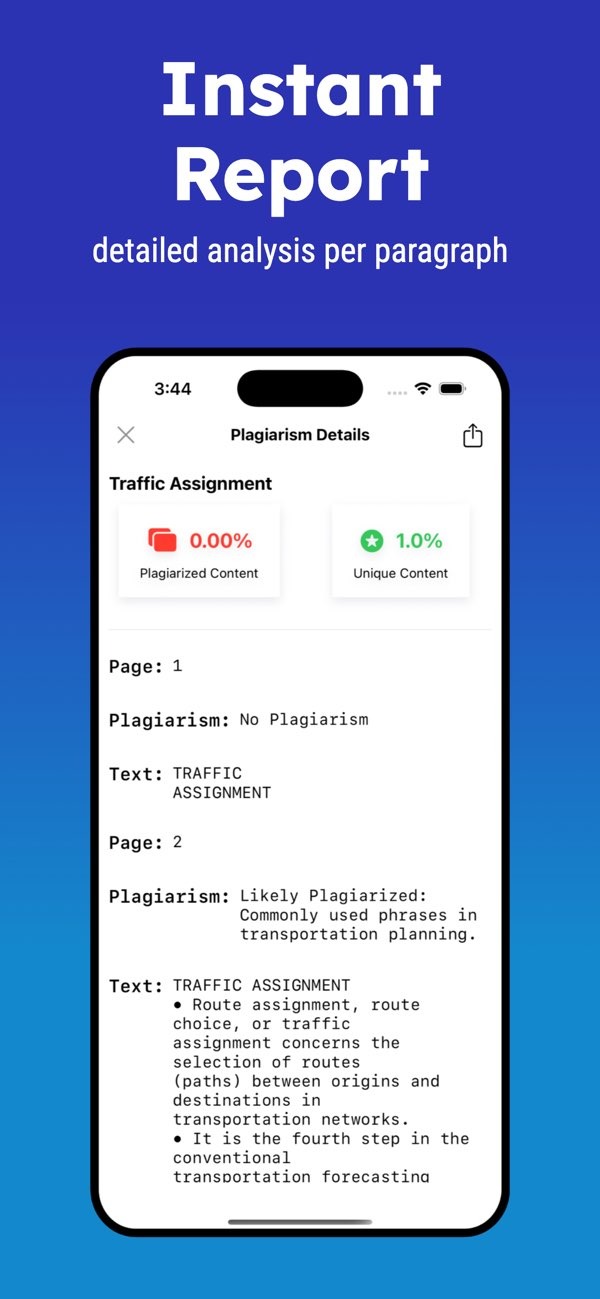
To make sure your writing is free from unintentional plagiarism, you can use the Plagiarism Checker on iOS. This tool gives instant reports with a detailed plagiarism check for each paragraph. This helps you rewrite and rephrase text while keeping your work original. It also includes tools to improve readability and save file history for later use.
 |
 |
Understanding Unintentional Plagiarism
Unintentional plagiarism happens when a writer uses someone else’s work without giving proper credit. This can happen when you do not fully understand citation rules, miss a source while paraphrasing, or make simple note-taking errors. Knowing how to spot and avoid unintentional plagiarism is important for academic integrity and for credibility in professional writing.
Unintentional plagiarism often comes from not knowing how to cite sources correctly or from mixing up common knowledge with original ideas. Some writers also think that changing a few words is enough. In most cases, it is not. Good paraphrasing means rewriting the idea in your own words and sentence structure while keeping the same meaning.
To reduce these risks, writers should learn the citation style used in their field, such as APA, MLA, or Chicago. When you follow these rules, you can credit sources correctly and lower the chance of unintentional plagiarism.
Using Online Tools to Detect Plagiarism
Online tools like the Plagiarism Checker on iOS can help you find unintentional plagiarism. These tools compare your text with a large database of published sources and look for matches. They then create reports that show possible problem areas, so you can fix them before you submit or publish your work.
The Plagiarism Checker app includes an instant report that checks each paragraph for possible plagiarism. This paragraph-by-paragraph view helps you find the exact parts that need work. After you review the report, you can revise the text and add citations where needed.
The app also includes a dark mode option. This can make long editing sessions more comfortable and reduce eye strain, especially when you work for many hours.
Step-by-Step Guide to Using Plagiarism Checker
- Download and install the Plagiarism Checker on iOS.
- Open the app and upload your document.
- Run the plagiarism check to receive an instant report.
- Review the highlighted sections and make the needed revisions.
- Run the check again to confirm that the issues are resolved.
Improving Readability and Content Quality
Plagiarism checks are important, but readability also matters. Clear writing helps you connect with your audience. The Plagiarism Checker app includes readability tools that use more than 10 different indexes. These indexes measure how complex your text is and whether it fits your target readers.
Readability tools look at sentence length, word choice, and overall flow. With this feedback, writers can break up long sentences and replace hard words with simpler ones. This can make your ideas easier to understand and improve the quality of the final draft.
For example, a technical document written for a general audience should limit jargon and avoid long, dense sentences. Readability tools can help you find these sections and revise them for better clarity.
Maintaining a History of Your Work
Keeping a history of your work helps you track changes and stay consistent. The Plagiarism Checker app lets users save and share file histories, so you can return to earlier versions of a document. This is helpful for group work, where many edits and drafts are common.
When you keep a record of drafts, you can compare versions and confirm that changes still match the original purpose of the document. It can also help you spot unintentional plagiarism that may have been added during editing.
Having a clear record of your drafts also shows how your ideas developed over time. This can be useful in both academic and professional settings.
Common Mistakes and How to Avoid Them
One common mistake is depending only on online tools and ignoring the basics of plagiarism. Tools like Plagiarism Checker are useful, but they work best when you also understand citation rules and source use.
Another mistake is weak paraphrasing. Changing only a few words is usually not enough. Writers should rewrite the full idea in their own words and structure while keeping the same meaning. Practicing this skill can greatly lower the risk of unintentional plagiarism.
Finally, skipping careful proofreading can leave problems in the final draft. Writers should set aside time to review and edit, check citations, and confirm that all content is original.
Frequently Asked Questions
For writers who want to keep their work free from unintentional plagiarism, tools like the Plagiarism Checker on iOS can be a practical option. These tools offer detailed checks and features that support content quality and readability. Visit Editr Apps for more information on their suite of writing tools.
